A remote platform
The building of a teleop system.
So, I’ve been building this TeleOp system.
Think: remote robot surgery, except for small jobs in factories.
Hopefully, a lot cheaper.
Here’s a video:
It’s certainly not a new idea. And it’s still got a long way to go.
Anyway, the video goes over some of the features. Below is a little more detail on the history, and where the project stands today:
+9 mins reading, +17 images

The remote-platform part of the solution is working quite well. It should soon be ready to prove out on real robot arms, but for now everything is tested in simulation.
This is a pair of Elephant Robotics MechArm 270. (Good enough for a POC.)
The simulator is Isaac Sim from NVIDIA. It’s a high-fidelity robotics simulation tool—and a rather hefty one too. It “requires” 🙄 a pretty decent GPU as a minimum spec.
It looks like this:

They’ve also got a WebRTC client. It gives you remote mouse and keyboard (and gamepads, etc.) to software running in the cloud—kind of like Remote Desktop.
So you don’t need a beefcake machine at home. You can just pay by the hour to run it in the cloud, which is sometimes inevitable for a power user.
Anyway, it works pretty great.
Before that, I also tried it all in Gazebo
Someone working at NVIDIA told me about Isaac Sim a while ago, and I was always curious why the company went to such a big effort to build a robotics simulator when Gazebo exists.
Maybe it’s simply because they wanted beautiful ray-tracing graphics.
Nonetheless, I took a look at some other open-source solutions. In each case, I checked sites like Fiverr and Upwork to see what kind of freelance community existed—the idea being it’s a quick way to gauge how much life is in a toolchain.
There was also some messing around in Webots.

Here are some old screenshots of getting a UR e-series hacked together in Gazebo.

And then I played with a Franka using MoveIt and trajectory planning—all ROS 2 based.

The ecosystem is… interesting. Although I’m not entirely convinced about ROS multicast as a default communication method.
RC-RP
Robotcompany(.net) – remote platform
The remote platform I’m building is similar in that it’s also WebRTC-based.
What I’ve added are connection and control features to put you (or some future AI) in the driver’s seat from a remote location.
Tools that let you go from big-swinging arms to fine-detail movements—gradually building up a feature set for refined control.

The operator client (the “frontend”) is built with the Svelte web framework, which allows very rapid feature development.
When I tried doing this with ROS 2 over a VPN

This is a TurtleBot simulation, again in Isaac Sim, running in a container on a Brev cloud host.
It was fully remote-controlled with a gamepad and ROS 2.
But it took a small stack of bolted-together technologies to get it working.

Not only that—because I was being cheap—I was using the cheapest Brev server I could manage. That meant two things:
- No persistence: the server was wiped every time I shut it down
- No port forwards
The method to this madness is that whatever I’m developing needs to be easy to deploy. One day it will be real machines in small businesses.
I have a history of deploying hardware to customers, and I know what a pain it is to set up a server on a remote site and deal with their networks.
So… it’s gotta look like a client. The server needs to be somewhere else.
Anyway, the issue came when it was time to start streaming the cameras from the robot down to the client. Running video over ROS wasn’t a smart idea.
Asking AI for another approach led to the Unity solution.
After that, much of this was running on Unity…
This is the Isaac Sim TurtleBot tutorial, running in the cloud over the first instance of the remote platform.
Again, with gamepad control and so on.

Many times in my life I’ve installed Unity and uninstalled it again a few months later.
I really like Unity—I just keep using it for the wrong things.
This time, my research suggested Unity was ideal for RTC—and it is. It really got the project moving early.
Unity also has a huge developer community. At one point, I even had an Upwork contractor building some UI features for me at a very good price.
However, I got slowed down when it came to using AI.
I found myself sending dozens of screenshots to agents, then constantly reminding them where the debug logs were.
The web, on the other hand, is all-text in the build. So AI can iterate and fix its work on its own.
But the true break came when (in another project) I ran into this recent(ish) addition to VS Code.

You just click the element and tell AI to fix it.
And… OMG, things went much faster.
Not only that: the operator client is way more lightweight now—which is one of the key goals.
I still have this nagging philosophy that you don’t use the web to make serious tools like this. So maybe one day I’ll come back to something Clang(ish)-based.
Having said that, a web-based client is a strong value proposition from companies like foxglove.dev.
So… we’ll see.
The operator client builds the UI locally, based on whatever configuration is defined on the target.
(As opposed to the Remote Desktop way.)
The main features are:
- Multiple customizable displays: independent position, size, frame rate, resolution
- Customizable controls: locally saved key bindings

I quite like the binding-modes function, because it lets you quickly switch what the gamepad input does.
Because 2 thumb-sticks is not enough
A standard gamepad has two joysticks, giving you 4-axis analog control.
But (one way or another) navigating 3D space needs 6.
So, if you want 6-axis analog control, you need to switch which axes you’re controlling.
The gamepad left shoulder button toggles between two control modes.
Its setup like this:

Unbelievable: this was a 1-shot* call to Claude Opus 4.6 with the target’s config file. It generated a perfectly accurate diagram of the gamepad configuration.
*Ok… there was a 2nd request to do it in a dark theme.
Connectivity (W.I.P.)
A main feature of the platform is the connectivity layers, which handle the video and control streams.

The basic functionality is working well. This shows the scalable window sizes (the video demo is the best way to see this).
The intention is to allow multiple operators to connect simultaneously to multiple targets. That way, one can easily jump between simulation and real-world robot setups, and work alongside other people and AI agents.
As such, you can:
- Take a real-world problem
- Simulate the problem
- Share the simulated problem with multiple 3rd-party operators to work on (with people, or with AI)
- Select the best provider to apply their results back to the real world
Something like that anyway… It’s still a work in progress, so these features are not in the linked video.
6DOF IK 🦾📐🤦
Getting a nice set of inverse kinematics (IK) on a 6-degrees-of-freedom (6DOF) robot arm is still a bit of a non-trivial job in 2026.
It’s one thing to drive around a little diff bot
Shortly after going web-based, I found myself struggling to control a poor TurtleBot around the room. I chose it because I’d heard of it, and it was in these very helpful tutorials.
Changing the model to the NVIDIA JetBot changed everything. I had this little guy zooming around factory floors in no time.

Why? Probably just some missing config that’s going to take too long to figure out.
The logic was that NVIDIA would likely make sure their own product configured correctly out of the box—and it’s green.
But a diff-bot is very easy to control compared to a robot arm. It’s just forward/backwards, turn-left, turn-right.
Nonetheless, there are so many libraries of code to draw from these days that the step from here to basic 6DOF robot arms is pretty small.
Direct joint control and even some basic IK is achievable in a day.
But it’s a whole other thing to have quality control of a robot arm. While this wasn’t even supposed to be a big part of the project, it became necessary in order to test out the remote control methods.
I shouldn’t complain, because AI agents have saved months of work.
If anything, it’s been a great exercise in understanding the nuances of robot joints and kinematics.
Also, the simulated target helps a lot in understanding the limitations of different arms. For example, the length of the head + gripper on these arms feels way too long in relation to the rest of the unit.

It’s not worth anyone’s time to describe it in more detail than that. But it’s very interesting to get a feel for, once you start using it.
Here’s a quick list of functions that had to be added.
- Basic inverse kinematics: Lets you move the EE (end effector: the head/the gripper) in all 6 directions. The NVIDIA Lula library is a good place to start.
- Singularities: These cause distortion when trying to move through them. Extra algorithms (such as damped least squares) are needed to navigate through these areas. Not only that—the entire system needs to be slowed down to get through it.
- Joint limits: Pretty simple: joints can only move so far and so fast (and with limited acceleration, etc.). It’s one thing to apply these limits, but the result is, again, distortion of the pose—so the limit needs to apply to the entire system.
- Reach limits:
This requires the robot to understand how far it can move. Easiest achieved by calculating a look-ahead position (Jacobian stuff). I.e.: “Can I go there?”
Here I’m trying to tell the robot to get closer to its base (move left). It can’t solve it, so the “reach pos” bar starts to go red.
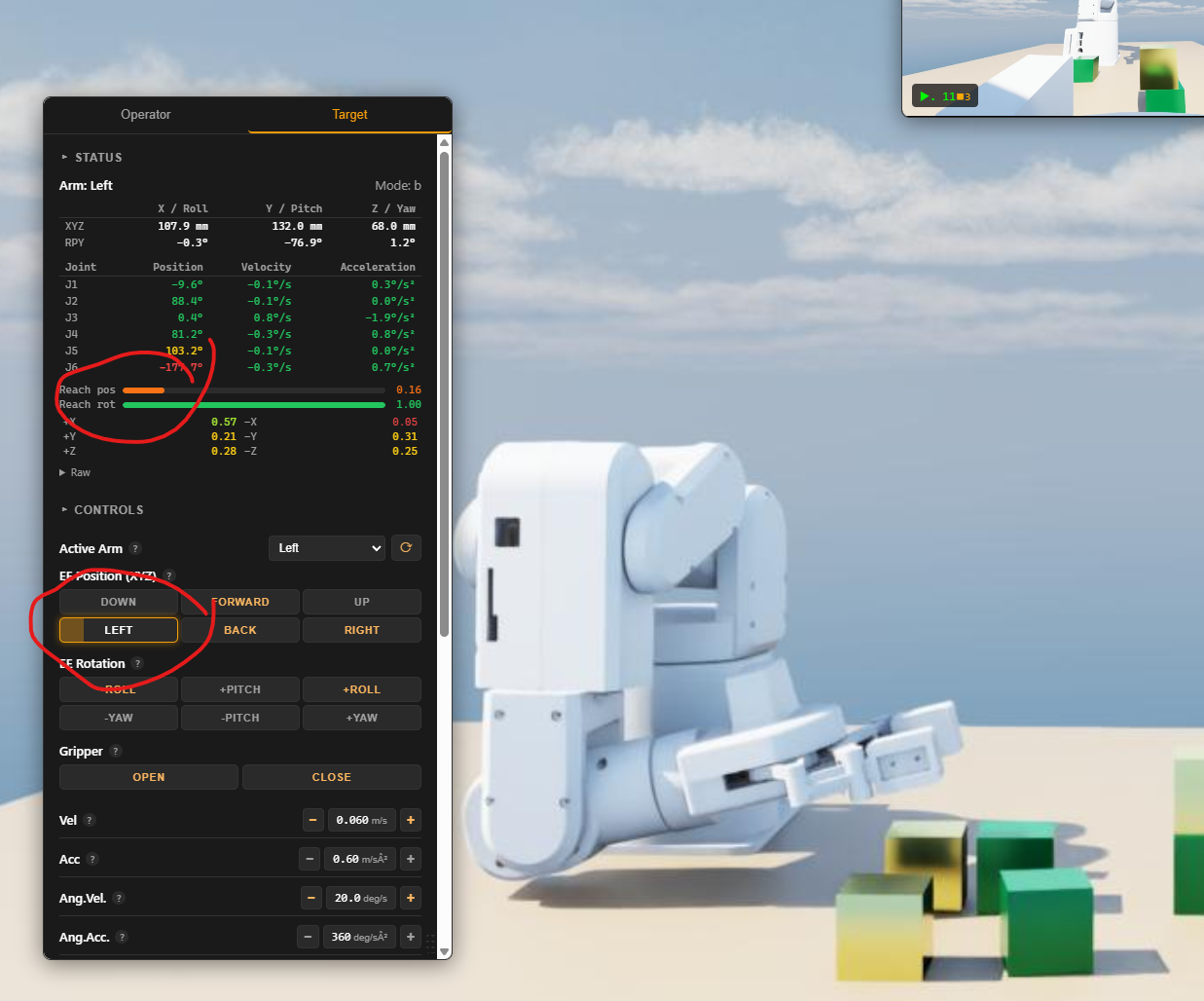
- Kinematic redundancy: Often there is more than one way for the IK solver to move to a position, and not all positions are equal. Since this is teleop, it doesn’t know what the intended goal is. The result is that the arm might not be able to reach a place that would have worked easily if a different set of bends were selected. I haven’t started on this one yet.
- Getting rid of the jerks: Always a big challenge. C2 acceleration continuity — “Because as you can see, it yeets off to fucking wherever.” (Also not started.)
These are a couple of hours each. (In the old days, it was much, much harder.)
Yes, but…
One might say, “Why teleop when you can just throw some AI at it directly?” It’s a fair question these days.
There are dozens of companies like this out there. https://www.rhoda.ai/ is one example.
But there are also a lot of companies right now falling back to teleop because their AI can’t get it right.
I think the future is a bit of a mix, and tools like this will help get more-powerful AI to remote locations… and people too.
I’m certainly interested in hearing your opinion.

Picking up my first block…
And the little teaser vid I made for social media.